B Corridor

- JavaScript
- Node
- Leaflet
- Cloudflare
- Git
A biodiversity website for a Waterford conservation project, with an interactive trail map and a CMS that lets the team publish without touching code.
What it is
B Corridor is a conservation project connecting habitats across Waterford. They needed a site that could explain the work, show people where the corridor actually runs, and let them post news themselves.
It is live at bcorridorwaterford.com, and the team has been publishing through the admin tool since June 2026.
The interactive trail map
The centrepiece. Six numbered stops along a walking trail, the corridor boundary, and a dotted route that follows real paths rather than cutting across buildings.
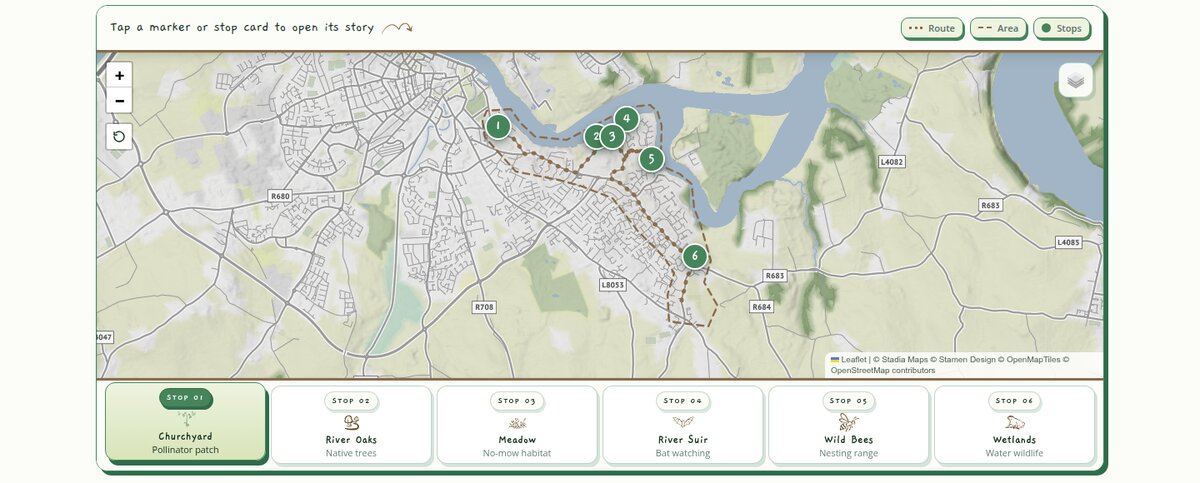
I placed the six stops in Google Earth myself and exported them, so the coordinates come straight from that file.
The line joining the stops is fetched from a free routing service so it follows real walking paths rather than cutting straight across the map, and falls back to straight lines between the stops if that request fails.
A live species card
Almost the whole site is static, but one card is alive. The “Did you know?” panel shows a real wildlife species that was actually recorded in Ireland, fresh each time you load the page.

It pulls from iNaturalist, a public database of nature sightings. The request asks for a research-grade, photographed observation of a plant, insect or bird, inside a box drawn around Ireland:
"https://api.inaturalist.org/v1/observations" +
"?photos=true&quality_grade=research&geo=true" +
"&iconic_taxa=Plantae,Insecta,Aves" +
"&swlat=51.3&swlng=-10.7&nelat=55.4&nelng=-5.4" +
"&order_by=random&per_page=50";
A second call fetches that species’ Wikipedia summary for the fact, and the photo and its credit come from the sighting itself.
The care is in what happens when it goes wrong. Every request has a timeout, so a slow server can never leave the card spinning. The photo is loaded off-screen first and only swapped in once it succeeds, so a broken image never shows. And if the whole thing fails, offline, API down, nothing usable found, the card falls back to one of two hand-written species so a visitor never sees an empty box.
Publishing without touching code
The people running B Corridor aren’t developers, so publishing a post had to feel like writing in Word, not editing a website. They open a private admin page, type a title, a date and the words, drop in a photo, and press save. That is the whole job. They never see the code, never touch a file, and never learn any markup.
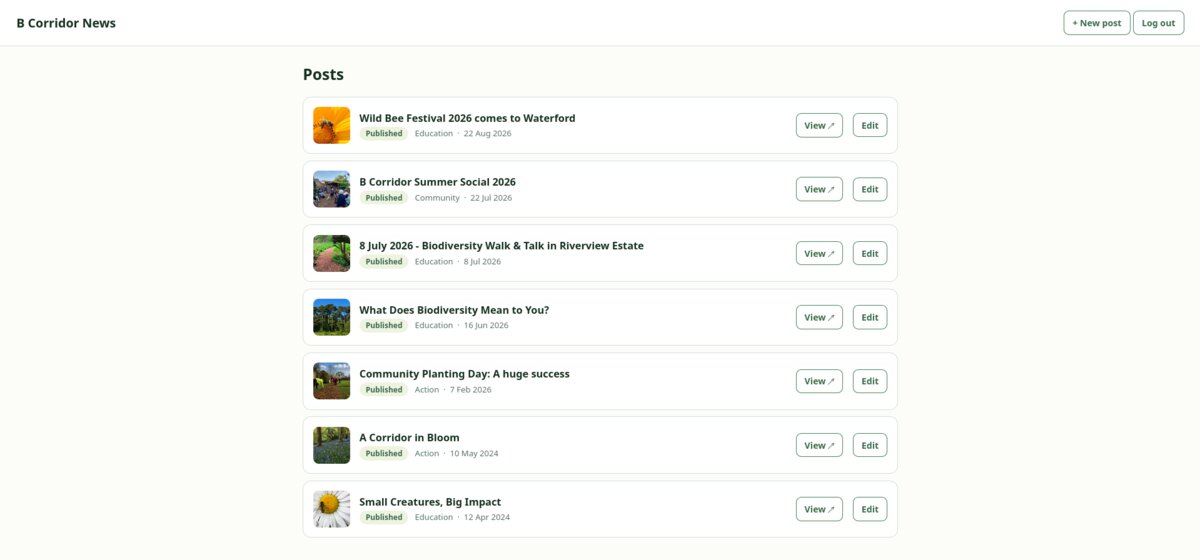
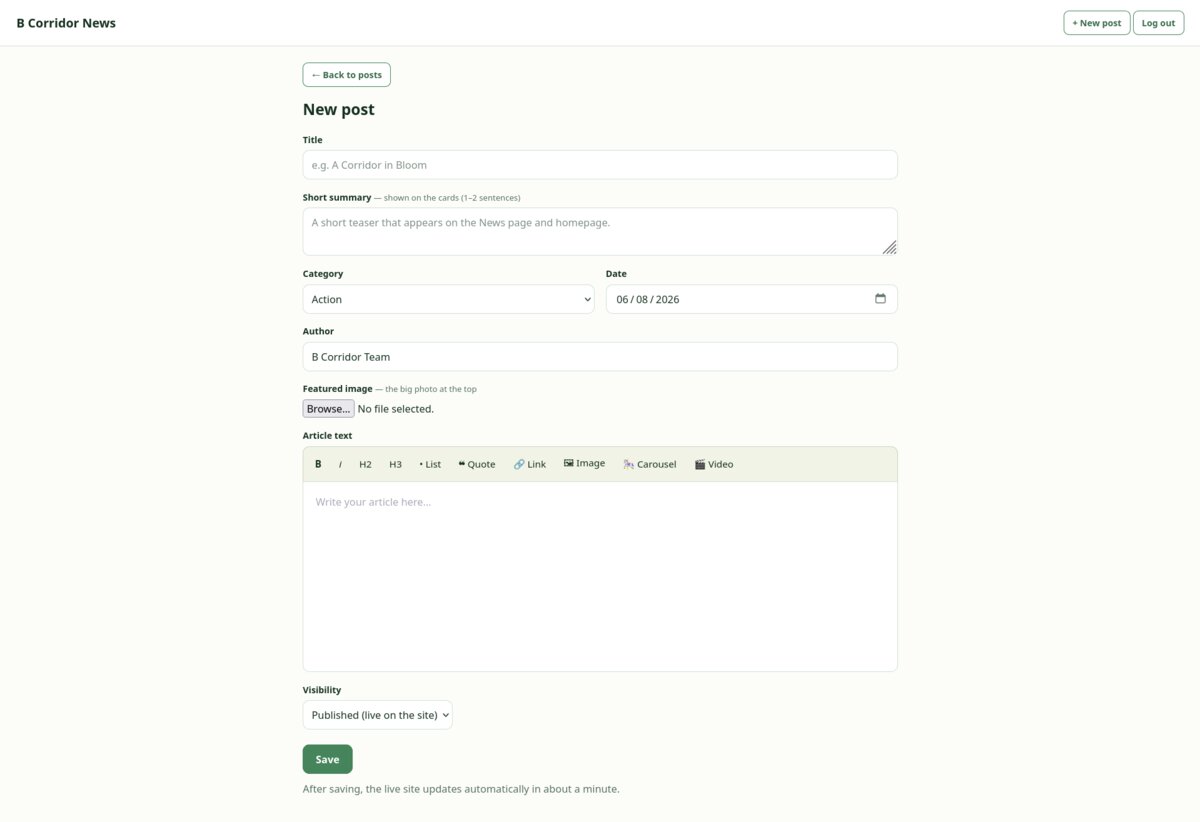
What happens next is the part I am most pleased with. The post is saved as plain text into the project’s history, which triggers a rebuild, which writes out every page fresh. One post becomes three things: a full article page, a card on the news page, and a card on the homepage. Nothing is copied by hand.
There is no database anywhere in the system.
Decisions, and what they cost
Every page is written out in advance
Most sites do their thinking when you arrive: you click, a server queries a database, and builds the page while you wait. This one does the opposite. Every page already exists before anyone asks for it, so visiting is just collecting a finished file.
That single decision explains most of the rest. It is why the site is fast, why it costs almost nothing to run, why a traffic spike cannot knock it over, and why there is no database to maintain, back up or secure.
The cost is that publishing is not instant. A post goes through a rebuild before it appears, so the team waits about a minute rather than seeing it live immediately. For a news page that is a fair trade. For something like live comments it would be the wrong one entirely.
The content lives in version control, not a database
Posts are saved as plain text files through GitHub’s API. Every edit becomes a dated, attributed commit that can be read or undone, and the content is never trapped: if the site were rebuilt from scratch tomorrow, the writing comes across intact.
Writes are slower than a database would be, and this would not suit a site with many editors working at once. With a handful of people posting news, it has not once been a problem.
Photos are shrunk in the browser, before upload
Phone photos arrive at 4 to 10 MB, which would make the site slow and fill the repository. So the editor’s own browser resizes and re-encodes each one before it is ever sent: a 4 MB photo leaves as roughly 200 KB.
The wrinkle is that older browsers, older Safari in particular, quietly ignore a request for the modern WebP format and hand back a large PNG, ignoring the quality setting with it. The code checks what actually came back and falls back to JPEG, so the image is always genuinely compressed rather than only apparently so.
The parts that were actually hard
The map sheet that would not close
On phones, each stop’s details come up as a sheet you swipe down to dismiss. Most of the time it closed fine. Every so often it didn’t, and just sat there stuck halfway.
The trouble was how I cleaned up afterwards. I’d tell the sheet to slide down, then wait for the browser to say the animation had finished before hiding it for good:
detailEl.style.transform = "translateY(100%)"; // slide it down
let done = false;
const finish = () => {
  if (done) return;
  done = true;
  // hide the sheet, reset it, take it out of the layout
};
detailEl.addEventListener("transitionend", finish);
It turns out that “finished” signal (transitionend) doesn’t always fire on
mobile, and when it didn’t, finish never ran and the sheet froze mid-slide.
The fix was one extra line, a short timer as a backup, so whichever lands first
does the cleanup (the done flag stops it happening twice):
setTimeout(finish, 360); // backup, in case transitionend never comesThe other half of this was the swiping itself. The sheet scrolls, so if I let any downward drag pull it away, you could never scroll to read anything. So it only starts to drag the sheet once you’re already scrolled to the top and still pulling down:
// while dragging from the sheet body:
if (detailEl.scrollTop > 0 || (dy <= 0 && deltaY === 0)) {
  startY = y;
  return; // scroll normally, don't pull the sheet
}
Anywhere above the top it just scrolls normally. Get it wrong and the whole panel peels off in your hand while you’re trying to read.
A scroll that threw you down the page
Tapping a stop scrolled it into view. On iPhones that occasionally flung you somewhere else on the page entirely.
It took me a while to work out why. On phones the sheet is pinned to the screen, and when you ask Mobile Safari to scroll a pinned element into view, it scrolls to where that element would have sat in the normal page flow instead, which could be miles away. The code wasn’t really wrong. I’d just assumed every browser meant the same thing by “scroll into view”, and they don’t. Now it only does that on desktop:
function maybeScrollToDetail() {
  // mqSheet matches on phones, where the sheet is pinned, so skip it there
  if (!mqSheet.matches) {
    detailEl.scrollIntoView({ behavior: "smooth", block: "nearest" });
  }
}
Photos that popped in one by one
The stop photos are named only inside the JavaScript, never in the HTML, so the browser’s preloader cannot see them coming. Every stop you opened, the photo appeared a beat late.
The fix was to quietly fetch them in the background while the browser is otherwise idle, so they are already cached by the time anyone taps a stop.
What I would change
The stylesheet is the weak point. It grew to 4,590 lines, and its later sections were written as corrections layered on top of earlier ones rather than edits to them, so one visual change can live in several places. Nothing is broken, but it is the part most likely to get harder over time, and it is where I would spend the next tidy-up.